> ## Documentation Index
> Fetch the complete documentation index at: https://klarity.ai/docs/llms.txt
> Use this file to discover all available pages before exploring further.
# Automation assessment
> Analyze a captured process and surface where automation pays off — with recommendations, estimated ROI, and implementation difficulty — so you prioritize with evidence.
export const NeedHelp = () =>
Need help? Use the in-app chat — click the chat bubble in the bottom-right corner of Klarity Architect (staffed 24×5) — or email support@klarity.ai.
;
Klarity analyzes a captured process and surfaces where automation would pay off — with recommendations, estimated ROI, and how hard each opportunity is to implement — so you can prioritize with evidence instead of hunches.
**Before you start:** a Klarity workspace. Assessing several related processes at once gives the best view of where to invest.
## Who it's for
Automation and COE teams, transformation leads, and operations leaders deciding where to invest automation effort.
## What you get
The **Automation Assessment** template identifies automation opportunities within the process, gives recommendations for each, estimates ROI, and rates implementation difficulty.
**How Klarity accelerates this:** instead of manually time-studying processes to build a business case, you capture them once and get ranked automation opportunities with ROI and difficulty — so you prioritize in hours, not weeks.
## Walkthrough: assessing a process for automation
Say your COE is looking at **order processing** to decide where automation pays off.
Assessing **several related processes** (or a whole value stream) gives the best read on where to invest — but capture current state at **individual process nodes** (recommended) so each one is clean. Set up the node(s) in the **Process Index**.
Use **Companion**, the **AI Interviewer**, or **file upload**. See [Current State Discovery](/docs/user-docs/discover/capturing-current-state).
Confirm the steps, systems, and time/volume attributes — automation ROI leans on accurate time-spent and error signals.
Three ways — pick based on how packaged vs. custom you want it:
* **From a template (packaged):** from the process node, click **Generate Documents** (or, from the **Artifact Operations** page, **+ Operation** in the top right), then select the **Automation Assessment** template and your capture, and generate.
* **With Advisor:** run a single-process assessment, or broadly rank automation potential across a value stream in one pass.
* **With the Klarity MCP (your own platform):** connect the MCP to your client (Claude, etc.), query your workspace as a company brain, and build your own ranking or assessment.
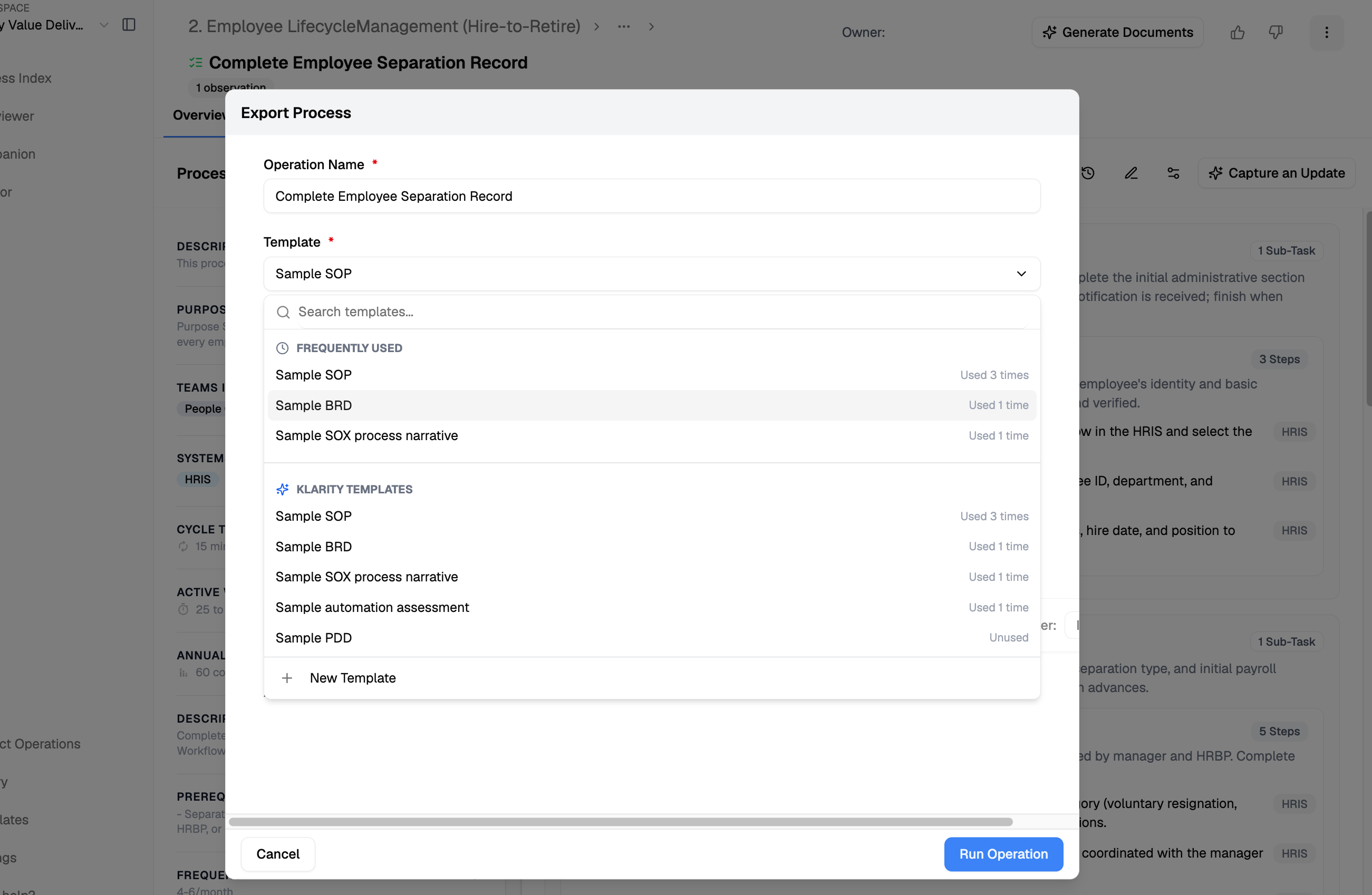 **Template vs. Advisor vs. MCP:** the template is the fastest packaged output; Advisor is best for a single or broad assessment on demand; the Klarity MCP lets you query the company brain from your own platform and build exactly the ranking you need.
Each opportunity comes with a recommendation, an ROI estimate, and an implementation-difficulty rating.
Rank ROI against implementation difficulty to build your automation backlog — quick wins first.
For each one you pursue, have Advisor outline what an automation would need to handle — including the edge cases and exceptions.
Use Advisor and the Template Designer to produce future-state designs, BRDs, and change materials for the opportunities you build. When one graduates into a project, pair it with [SDLC & PMO](/docs/custom-use-cases/sdlc-pmo).
## Advisor prompts
```text Rank automation potential theme={null}
Rank the processes in [value stream] by automation potential, weighted by time spent and error rate.
```
```text Scope an automation theme={null}
Outline what an automation would need to handle for this process, including the edge cases and exceptions.
```
```text ROI and difficulty theme={null}
Estimate the ROI of automating this process and rate the implementation difficulty.
```
## Tips
* Assess across several related processes to spot patterns worth automating once and reusing.
* Pair with a BRD (see [SDLC & PMO](/docs/custom-use-cases/sdlc-pmo)) when an opportunity graduates into a build.
## Related
Surface insights and opportunities across your processes.
The Templates Editor and how output templates work.
**Template vs. Advisor vs. MCP:** the template is the fastest packaged output; Advisor is best for a single or broad assessment on demand; the Klarity MCP lets you query the company brain from your own platform and build exactly the ranking you need.
Each opportunity comes with a recommendation, an ROI estimate, and an implementation-difficulty rating.
Rank ROI against implementation difficulty to build your automation backlog — quick wins first.
For each one you pursue, have Advisor outline what an automation would need to handle — including the edge cases and exceptions.
Use Advisor and the Template Designer to produce future-state designs, BRDs, and change materials for the opportunities you build. When one graduates into a project, pair it with [SDLC & PMO](/docs/custom-use-cases/sdlc-pmo).
## Advisor prompts
```text Rank automation potential theme={null}
Rank the processes in [value stream] by automation potential, weighted by time spent and error rate.
```
```text Scope an automation theme={null}
Outline what an automation would need to handle for this process, including the edge cases and exceptions.
```
```text ROI and difficulty theme={null}
Estimate the ROI of automating this process and rate the implementation difficulty.
```
## Tips
* Assess across several related processes to spot patterns worth automating once and reusing.
* Pair with a BRD (see [SDLC & PMO](/docs/custom-use-cases/sdlc-pmo)) when an opportunity graduates into a build.
## Related
Surface insights and opportunities across your processes.
The Templates Editor and how output templates work.