> ## Documentation Index
> Fetch the complete documentation index at: https://klarity.ai/docs/llms.txt
> Use this file to discover all available pages before exploring further.
# Process documentation (SOPs & PDDs)
> Produce step-by-step SOPs and higher-level PDDs from a real capture — documentation that reflects how work actually happens and stays current as it changes.
export const NeedHelp = () =>
Need help? Use the in-app chat — click the chat bubble in the bottom-right corner of Klarity Architect (staffed 24×5) — or email support@klarity.ai.
;
Klarity produces clean process documentation — step-by-step SOPs and higher-level PDDs — from a recording or interview, so documentation reflects how work actually happens and stays current as it changes.
**Before you start:** a Klarity workspace, the process you want to document, and (optionally) your house documentation format to build into a custom template.
## Who it's for
Operations teams, process owners, and enablement teams who need reliable documentation without weeks of manual writing.
## What you get
* **SOP (Standard Operating Procedure)** — a detailed, step-by-step guide to how a process is done today.
* **PDD (Process Definition Document)** — scope, executive summary, and a high-level flow.
**How Klarity accelerates this:** documentation that used to take days of shadowing and writing comes from a single capture — and Companion keeps the underlying process current, so your SOPs don't go stale the moment the process changes.
## Walkthrough: documenting a process
Say you're documenting how your team **processes a customer refund** so any teammate can follow it.
Document at the **individual process node** (recommended) — one node for the process you're writing up (for example, `Order to Cash → Returns → Process Refund`). For a broader manual you can walk an **entire value stream**, but node-by-node keeps each document focused. Create the node in the **Process Index**.
* **Companion** — record someone doing a refund end to end.
* **AI Interviewer** — walk the process owner through it (Observation or Q\&A mode).
* **File upload** — an existing recording or rough notes.
See [Current State Discovery](/docs/user-docs/discover/capturing-current-state).
Klarity drafts; you refine. Confirm the steps, systems, and decision points are right before generating — accurate input is what makes a usable SOP.
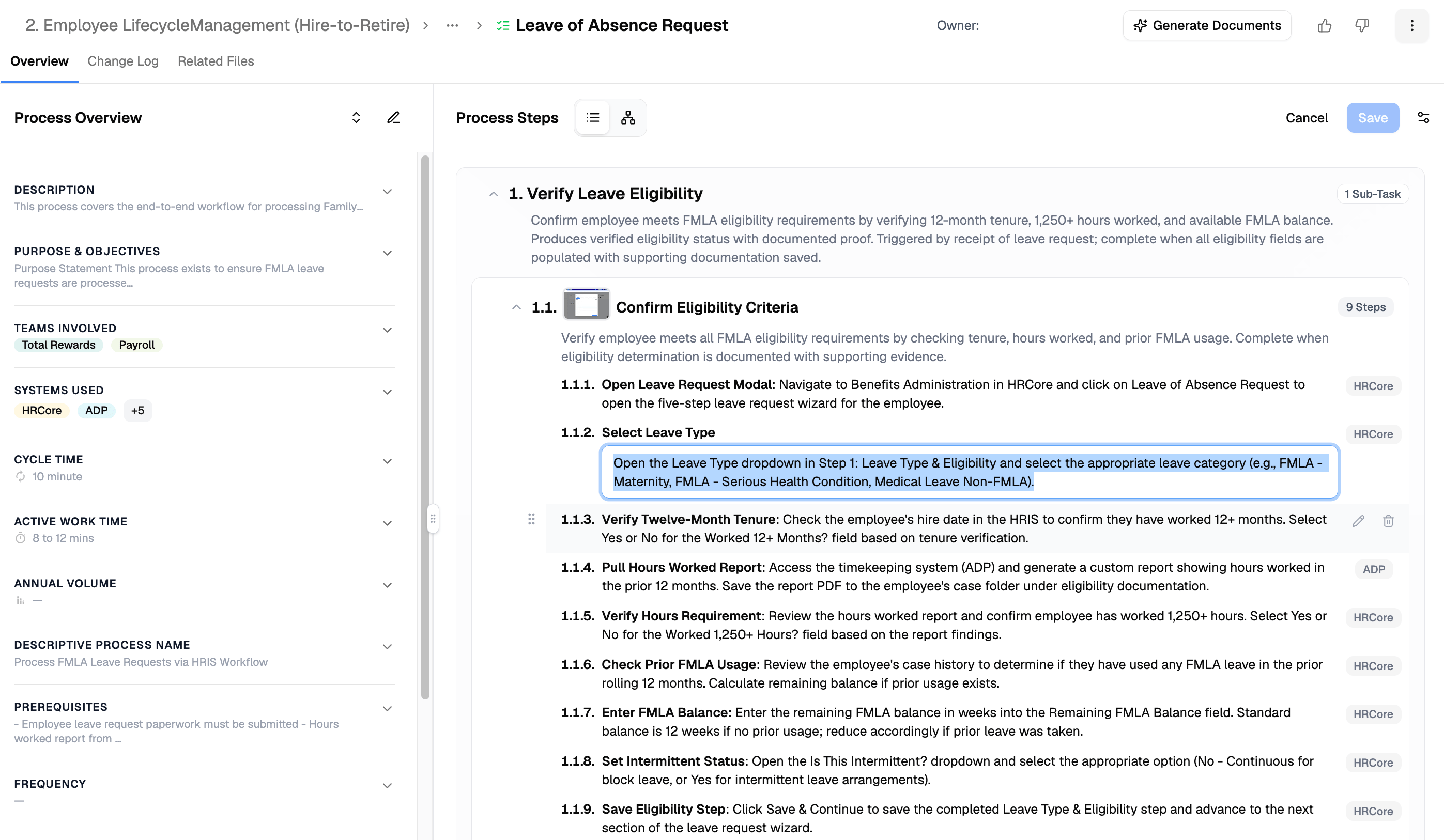 * **SOP** when people need to *follow* the process — detailed, step-by-step.
* **PDD** when leaders need to *understand* it — scope, summary, and high-level flow.
Three ways — pick based on how packaged vs. custom you want it:
* **From a template (packaged):** from the process node, click **Generate Documents** (or, from the **Artifact Operations** page, **+ Operation** in the top right), then select the **SOP** (or **PDD**) template and your capture, and generate.
* **With Advisor:** ask for a single document, or broadly generate docs across a value stream in one pass.
* **With the Klarity MCP (your own platform):** connect the MCP to your client (Claude, etc.), query your workspace as a company brain, and generate the doc — or a custom format — yourself.
* **SOP** when people need to *follow* the process — detailed, step-by-step.
* **PDD** when leaders need to *understand* it — scope, summary, and high-level flow.
Three ways — pick based on how packaged vs. custom you want it:
* **From a template (packaged):** from the process node, click **Generate Documents** (or, from the **Artifact Operations** page, **+ Operation** in the top right), then select the **SOP** (or **PDD**) template and your capture, and generate.
* **With Advisor:** ask for a single document, or broadly generate docs across a value stream in one pass.
* **With the Klarity MCP (your own platform):** connect the MCP to your client (Claude, etc.), query your workspace as a company brain, and generate the doc — or a custom format — yourself.
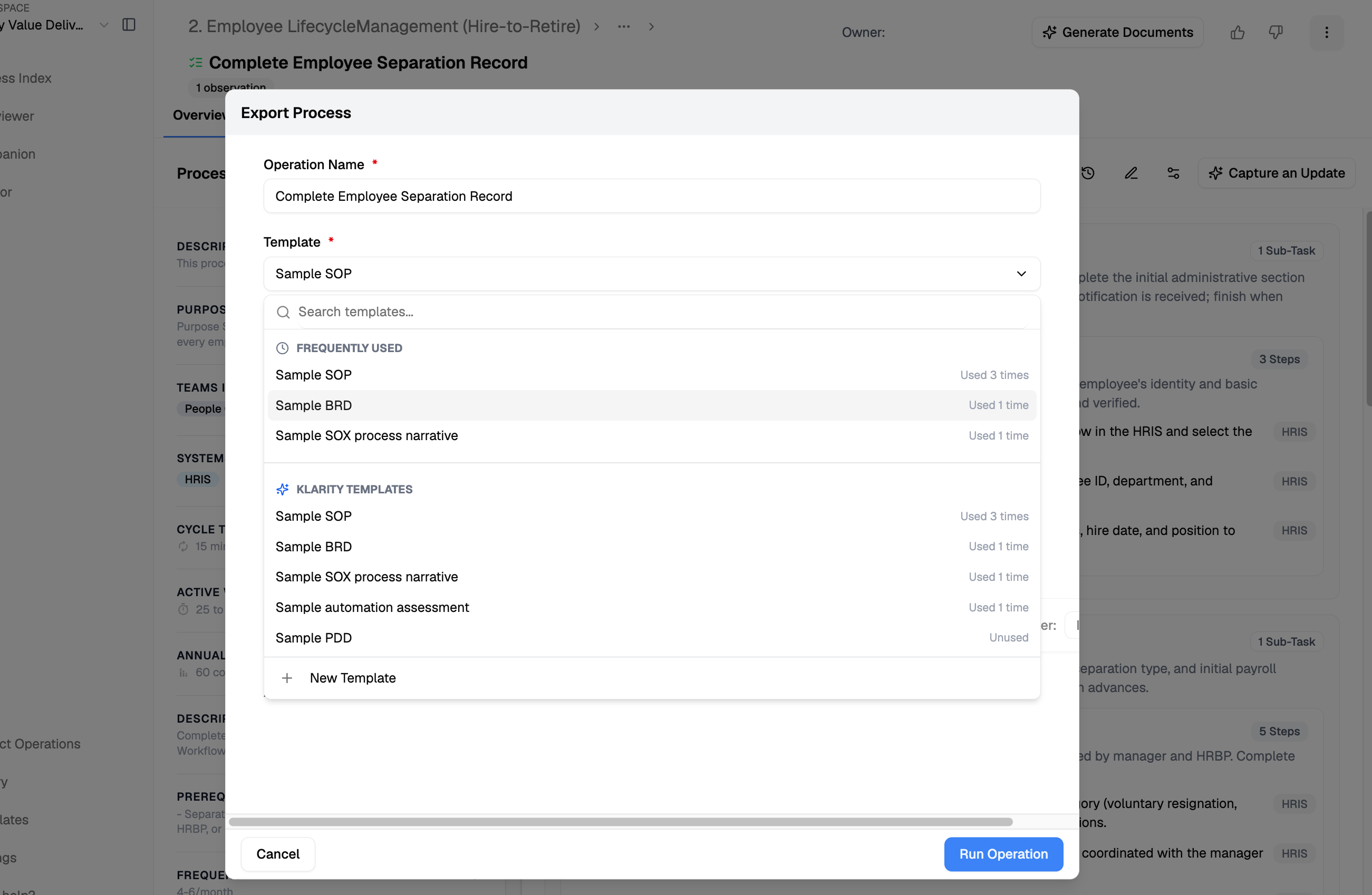 **Template vs. Advisor vs. MCP:** the template is the fastest packaged output; Advisor is best for a single or broad doc on demand; the Klarity MCP lets you query the company brain from your own platform and produce exactly the format you need.
Have the owner confirm the steps and details are accurate — the human-in-the-loop pass before it's official.
Export the SOP/PDD for your wiki, LMS, or handbook, or share the link.
Let **Companion** keep the underlying process up to date as work evolves, and re-generate the document when it changes — so it never goes stale.
## Advisor prompts
```text Find gaps in the draft theme={null}
Review this SOP against the captured process — what steps or decision points are missing or ambiguous?
```
```text Make it new-hire friendly theme={null}
Rewrite this SOP for someone doing the process for the first time — call out the non-obvious steps and the common mistakes.
```
## Tips
* Choose SOP when people need to *follow* the process; PDD when leaders need to *understand* it.
* Set your terminology and formatting once in a [custom template](/docs/user-docs/advanced/using-and-editing-templates) so every document matches your standards.
## Related
Customize SOP/PDD output to your documentation standards.
The three ways to capture a process.
**Template vs. Advisor vs. MCP:** the template is the fastest packaged output; Advisor is best for a single or broad doc on demand; the Klarity MCP lets you query the company brain from your own platform and produce exactly the format you need.
Have the owner confirm the steps and details are accurate — the human-in-the-loop pass before it's official.
Export the SOP/PDD for your wiki, LMS, or handbook, or share the link.
Let **Companion** keep the underlying process up to date as work evolves, and re-generate the document when it changes — so it never goes stale.
## Advisor prompts
```text Find gaps in the draft theme={null}
Review this SOP against the captured process — what steps or decision points are missing or ambiguous?
```
```text Make it new-hire friendly theme={null}
Rewrite this SOP for someone doing the process for the first time — call out the non-obvious steps and the common mistakes.
```
## Tips
* Choose SOP when people need to *follow* the process; PDD when leaders need to *understand* it.
* Set your terminology and formatting once in a [custom template](/docs/user-docs/advanced/using-and-editing-templates) so every document matches your standards.
## Related
Customize SOP/PDD output to your documentation standards.
The three ways to capture a process.