> ## Documentation Index
> Fetch the complete documentation index at: https://klarity.ai/docs/llms.txt
> Use this file to discover all available pages before exploring further.
# Klarity for project management & SDLC teams
> An advanced use case for PMO and SDLC delivery teams: source requests, scope requirements, and deliver — with Klarity gathering inputs and generating the artifacts at each stage.
export const NeedHelp = () =>
Need help? Use the in-app chat — click the chat bubble in the bottom-right corner of Klarity Architect (staffed 24×5) — or email support@klarity.ai.
;
If your job is moving projects through their lifecycle — sourcing requests, scoping requirements, and delivering — Klarity helps at each stage. It gathers the inputs each stage needs in a consistent format, turns them into the artifacts that move the project forward, and once you're delivering, that work flows into Klarity's normal **Discover → Structure → Improve** loop.
**Before you start:** a Klarity workspace, and your intake / requirements framework on hand (BRD template, intake checklist) to shape custom Interviewer questions.
## Who it's for
* **SDLC delivery teams** — the people responsible for delivering through the software or project lifecycle (business analysts, project leads, delivery managers).
* **PMOs** — the people responsible for **sourcing, scoping, and delivering** projects.
## The project journey
Klarity supports the people who move a project from a request to a delivered outcome. Here's how it helps at each stage — who owns it, and the steps to do it.
**Who owns it:** the PMO and project sponsors bringing in requests.
**Goal:** capture every request in a consistent, structured format so nothing is lost between "we need this" and scoping.
**Create a project node** in the **Process Index** to hold the request (for example, a `Projects → [Project name]` node), then **configure custom Interviewer questions** that mirror your intake framework — one question per BRD field (justification, scope, success criteria, resources, timeline, dependencies, risks).
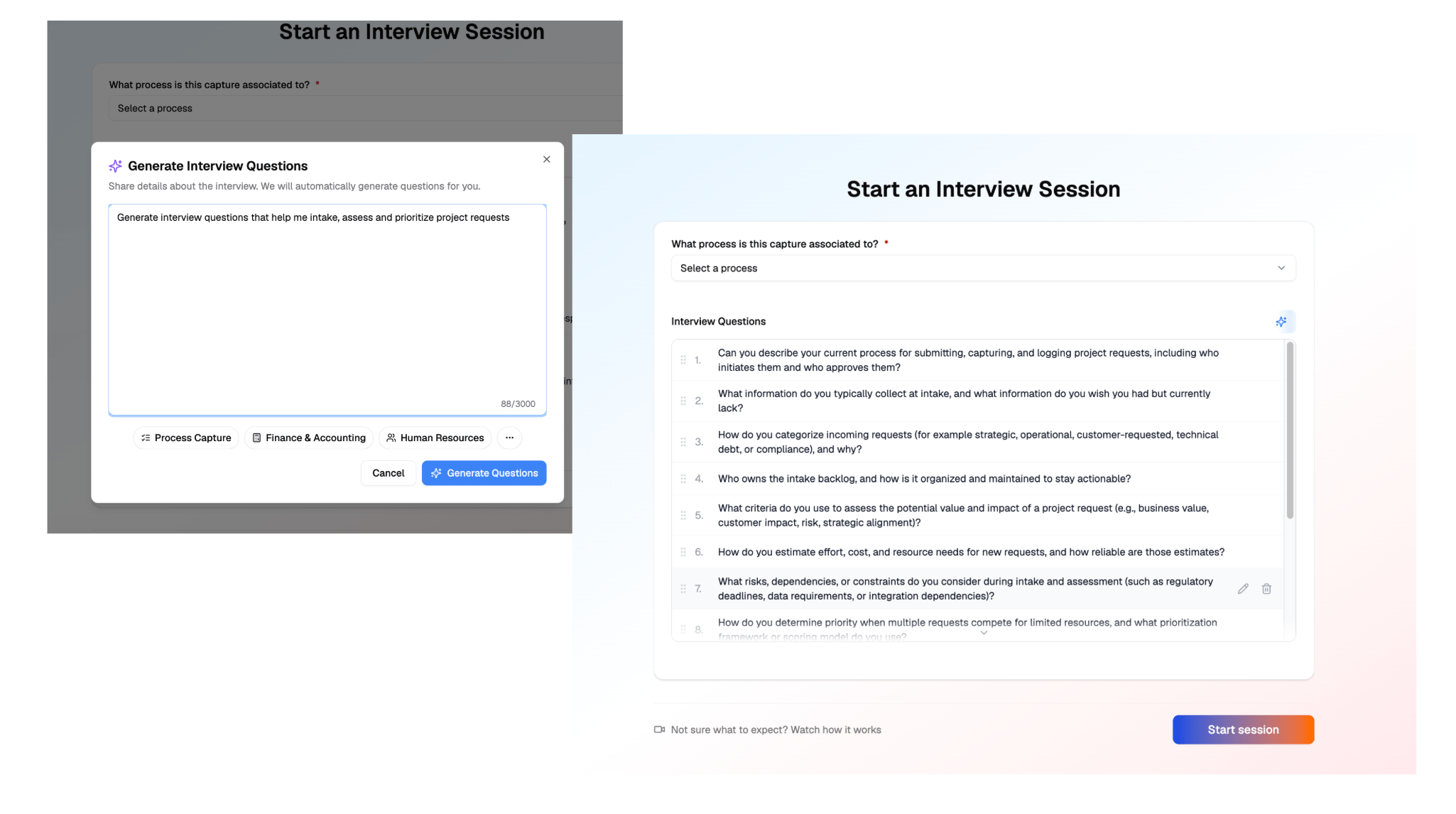 **Run the AI Interviewer intake** with the requestor — Observation Mode for a free walkthrough of what they need, or Q\&A Mode to drive the structured questions. Every request comes back in the same shape, no matter who's asking. Then **review the intake** for completeness before handing it to scoping — fill any gaps with a quick follow-up Q\&A session.
**How Klarity accelerates intake:** one structured Interviewer session replaces rounds of intake meetings, email chains, and inconsistent request forms — every request is captured the same way, in one pass, and lands ready to scope.
**Who owns it:** business analysts, project managers, and architects turning a request into a plan.
**Goal:** turn the raw intake into an approved, buildable scope.
**Generate the BRD.** Load your BRD template and requirements checklists in the workspace / Context Store so the output matches your format, then generate the BRD from the intake — three ways: from the **BRD template** (click **Generate Documents** on the process node, packaged), with **Advisor** (a single BRD, or broadly across several intakes at once), or via the **Klarity MCP** from your own client. No manual transcription. Review and baseline it with stakeholders — once approved, it's the committed scope everything is measured against.
**Run the AI Interviewer intake** with the requestor — Observation Mode for a free walkthrough of what they need, or Q\&A Mode to drive the structured questions. Every request comes back in the same shape, no matter who's asking. Then **review the intake** for completeness before handing it to scoping — fill any gaps with a quick follow-up Q\&A session.
**How Klarity accelerates intake:** one structured Interviewer session replaces rounds of intake meetings, email chains, and inconsistent request forms — every request is captured the same way, in one pass, and lands ready to scope.
**Who owns it:** business analysts, project managers, and architects turning a request into a plan.
**Goal:** turn the raw intake into an approved, buildable scope.
**Generate the BRD.** Load your BRD template and requirements checklists in the workspace / Context Store so the output matches your format, then generate the BRD from the intake — three ways: from the **BRD template** (click **Generate Documents** on the process node, packaged), with **Advisor** (a single BRD, or broadly across several intakes at once), or via the **Klarity MCP** from your own client. No manual transcription. Review and baseline it with stakeholders — once approved, it's the committed scope everything is measured against.
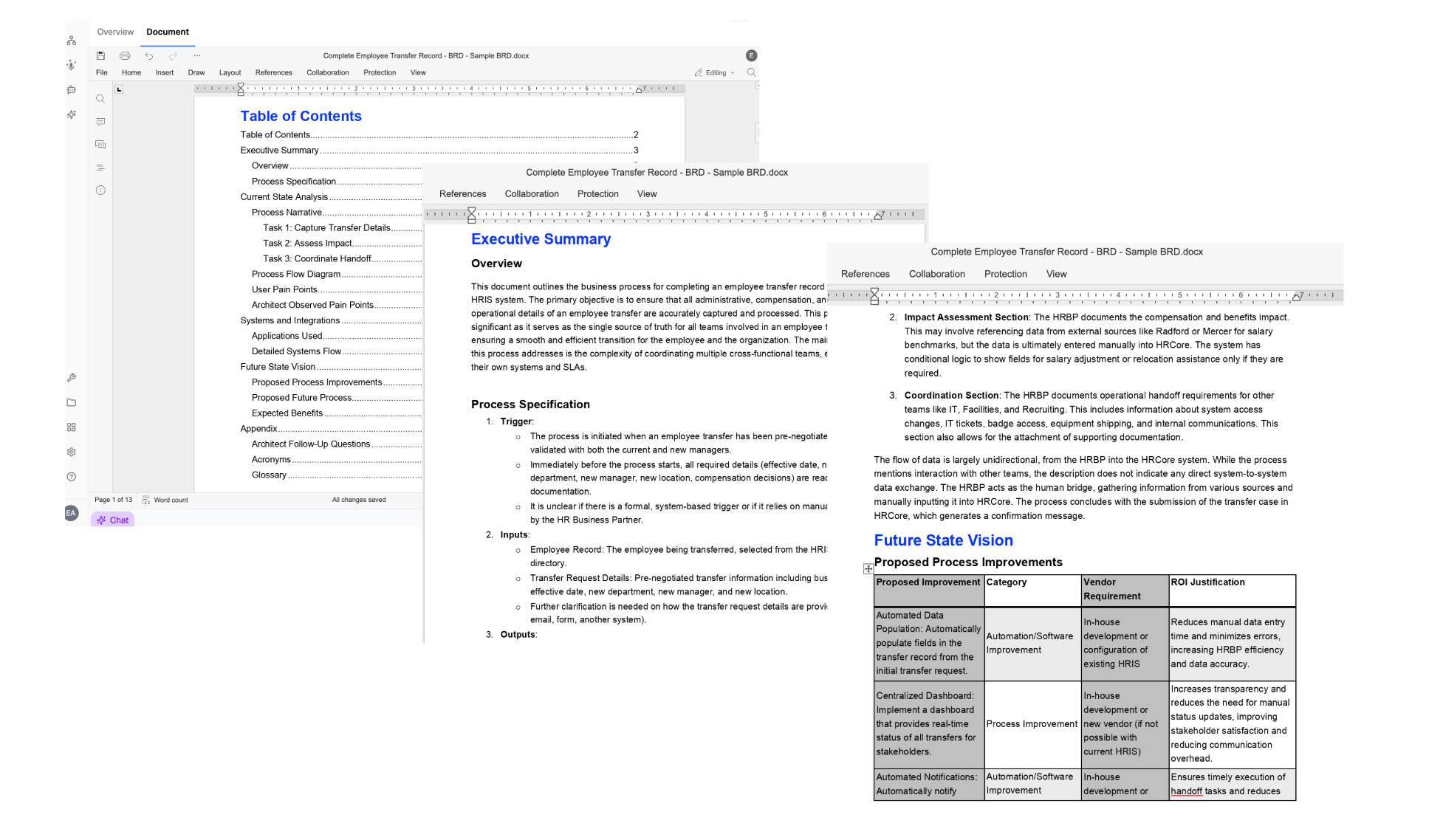 **Generate user stories.** From the approved BRD, generate user stories with the User Story template, ready for development sprints — then ask Advisor to review the BRD for missing or ambiguous requirements before the build starts.
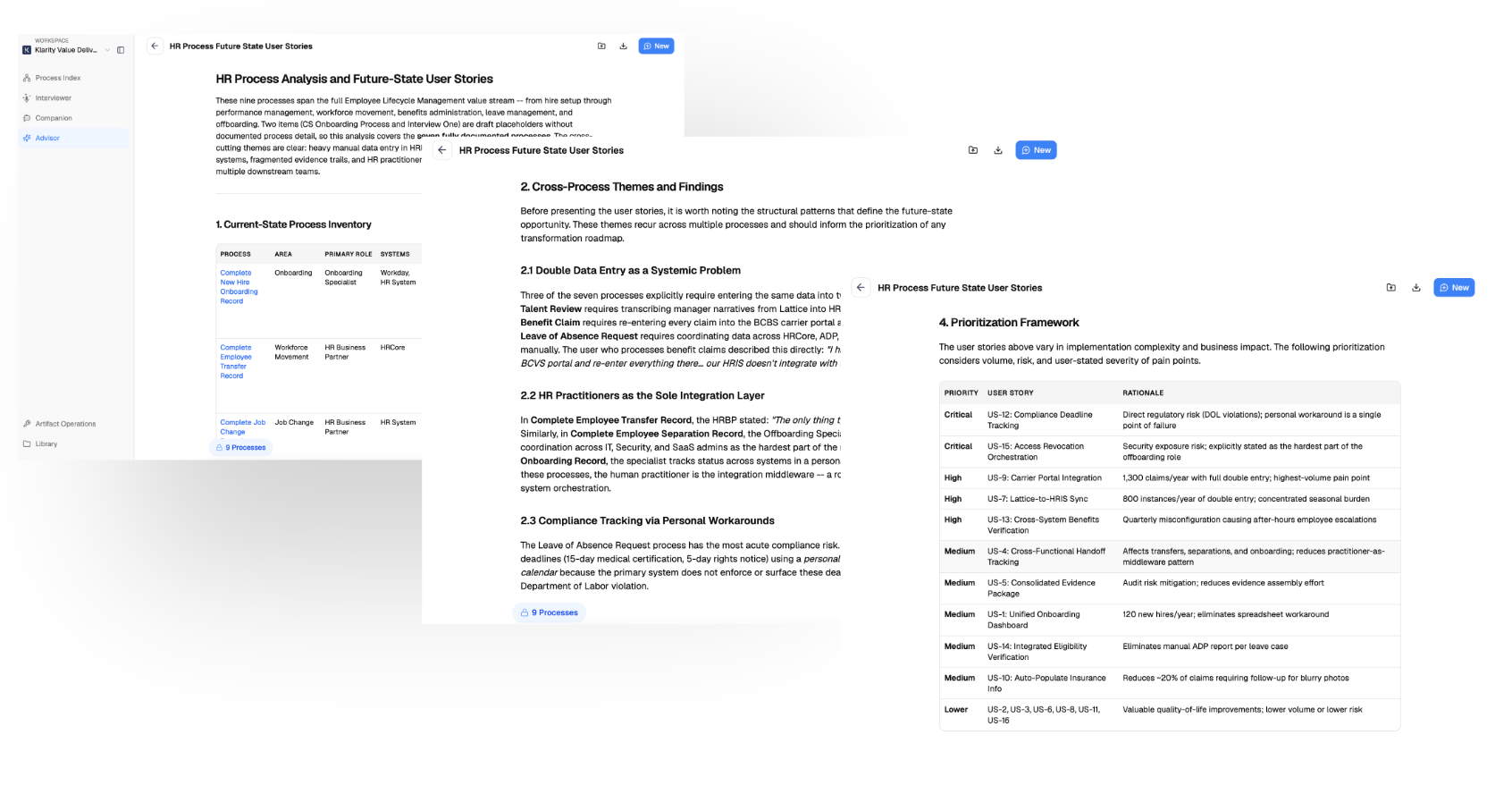 **How Klarity accelerates scoping:** the BRD and user stories are generated straight from the intake — no manual transcription, no blank-page drafting — so a BA reaches an approved, buildable scope in a fraction of the usual time.
**Who owns it:** the delivery team building and operationalizing the process.
**Goal:** build it, ship it, and fold the new process into your living process library.
1. **Hand off to the build** — export the BRD and user stories into your sprint / delivery tooling.
2. **Capture the new process as it goes live** — run **Companion** or the **AI Interviewer** on the process people now actually do. This is the moment the project enters Klarity's normal product journey.
3. **Structure it** — place the new process node in your **Process Index** so it lives alongside the rest of your operation.
4. **Improve it** — once it's running, use **Advisor** to find friction and opportunities, just like any other process.
**How Klarity accelerates delivery:** the delivered process documents itself — capturing it feeds your living process library automatically, so there's no separate write-up effort and the documentation never goes stale.
**Delivering a project flows into the normal Klarity journey.** The deliver stage above *is* the **Discover → Structure → Improve** loop — the project graduates from "a plan" into a real, maintained process, not a doc that goes stale. See [Getting started](/docs/user-docs/getting-started).
## What you get
* **BRD (Business Requirements Document)** — consolidates current state, pain points, technical requirements, system flows, and expected benefits.
* **User Story templates** — auto-generate stories from a BRD, ready for development sprints.
**Advisor or the MCP — your company brain.** Everything you capture is queryable in-app with **Advisor**, or via the **Klarity MCP** from your own client (Claude, etc.), so you can build exactly the requirements or analysis you need — not just the packaged templates.
## Advisor prompts
```text Intake vs. approved scope theme={null}
Compare the original intake against the approved BRD — were any requirements dropped or modified?
```
```text Scope changes in delivery theme={null}
From the delivery documents, identify scope items that changed, were descoped, or added without approval.
```
```text Requirements gaps theme={null}
Review this BRD against [standard/checklist] — what's missing or ambiguous before we build?
```
## Tips
* **Standardize intake before you automate it.** If intake is different every time, the AI reflects that inconsistency — nail the framework first.
* **Capture scope from the intake, not a blank page.** A grounded BRD beats one written from scratch.
* **Layer information progressively.** Add detail as it arrives — requirements at intake, design during scoping, the live process at delivery.
## Where to go next
The Discover → Structure → Improve journey your delivered projects flow into.
Build the BRD or user-story template these workflows rely on.
**How Klarity accelerates scoping:** the BRD and user stories are generated straight from the intake — no manual transcription, no blank-page drafting — so a BA reaches an approved, buildable scope in a fraction of the usual time.
**Who owns it:** the delivery team building and operationalizing the process.
**Goal:** build it, ship it, and fold the new process into your living process library.
1. **Hand off to the build** — export the BRD and user stories into your sprint / delivery tooling.
2. **Capture the new process as it goes live** — run **Companion** or the **AI Interviewer** on the process people now actually do. This is the moment the project enters Klarity's normal product journey.
3. **Structure it** — place the new process node in your **Process Index** so it lives alongside the rest of your operation.
4. **Improve it** — once it's running, use **Advisor** to find friction and opportunities, just like any other process.
**How Klarity accelerates delivery:** the delivered process documents itself — capturing it feeds your living process library automatically, so there's no separate write-up effort and the documentation never goes stale.
**Delivering a project flows into the normal Klarity journey.** The deliver stage above *is* the **Discover → Structure → Improve** loop — the project graduates from "a plan" into a real, maintained process, not a doc that goes stale. See [Getting started](/docs/user-docs/getting-started).
## What you get
* **BRD (Business Requirements Document)** — consolidates current state, pain points, technical requirements, system flows, and expected benefits.
* **User Story templates** — auto-generate stories from a BRD, ready for development sprints.
**Advisor or the MCP — your company brain.** Everything you capture is queryable in-app with **Advisor**, or via the **Klarity MCP** from your own client (Claude, etc.), so you can build exactly the requirements or analysis you need — not just the packaged templates.
## Advisor prompts
```text Intake vs. approved scope theme={null}
Compare the original intake against the approved BRD — were any requirements dropped or modified?
```
```text Scope changes in delivery theme={null}
From the delivery documents, identify scope items that changed, were descoped, or added without approval.
```
```text Requirements gaps theme={null}
Review this BRD against [standard/checklist] — what's missing or ambiguous before we build?
```
## Tips
* **Standardize intake before you automate it.** If intake is different every time, the AI reflects that inconsistency — nail the framework first.
* **Capture scope from the intake, not a blank page.** A grounded BRD beats one written from scratch.
* **Layer information progressively.** Add detail as it arrives — requirements at intake, design during scoping, the live process at delivery.
## Where to go next
The Discover → Structure → Improve journey your delivered projects flow into.
Build the BRD or user-story template these workflows rely on.